Most SEO programmes stall at the same place. You’ve done the research, you might even have neat clusters, but nothing has been decided. Which page targets which query? Where does the new content go versus where you refresh? Which two URLs are quietly competing for the same intent? Keyword mapping is the stage that answers those questions, turning a pile of keywords into a spreadsheet that tells you exactly what to write, where, and why.
This guide walks through a practical, Google Search Console–first workflow for building a keyword map, the exact template fields to use, and worked examples for different site types. The approach mirrors how Dango treats first-party data: your impressions, positions, and live queries are more reliable than modelled volume when you’re deciding which page should own a topic.
What Is Keyword Mapping?
The simple definition
Keyword mapping is the process of assigning groups of related keywords to specific URLs on your site. Each cluster of queries gets a home page, a primary keyword, supporting secondary keywords, a labelled intent, and an action: keep, refresh, create, consolidate, or redirect.
A keyword map is the operational document that records all of those decisions in one place. It’s not a research dump and it isn’t a wish list. It’s the controlled handoff between strategy and production, and it should be specific enough that anyone on the team can look at a row and know what to do next.
How keyword mapping differs from keyword research and clustering
These three stages get blurred together, but they answer different questions.
Keyword research answers what could we target? It produces a raw list of queries from GSC, Ahrefs, Semrush, autocomplete, and competitor data. There’s no structure yet, just demand and opportunity.
Keyword clustering answers which queries belong together? It groups those raw keywords by meaning, intent, and SERP overlap so you stop treating “best running shoes” and “running shoe reviews” as two separate projects. If you want to see how clusters actually look in practice, our keyword clustering examples walk through real output with intent labels and split-versus-merge decisions.
Keyword mapping answers where does each cluster live, and what do we do about it? This is the page-assignment stage. Clustering tells you that twelve queries form one topic; mapping decides whether that topic becomes a new pillar page, gets folded into an existing post, or triggers a refresh of a page that’s already ranking on page two.
The order matters. Research feeds clustering, clustering feeds mapping, and mapping feeds your content briefs. Skipping the mapping stage is how sites end up with three blog posts all chasing the same search intent.
What a completed keyword map should help you decide
A finished map should let you answer, at a glance:
- Which existing pages to leave alone, refresh, or expand
- Which net-new pages to commission, and in what priority order
- Which URL owns each topic, so writers never accidentally duplicate it
- Where internal links should point and what anchor text to use
- Which clusters are blocked by cannibalization and need resolving first
If your spreadsheet can’t answer those questions, it’s still a research export, not a map.
Why Keyword Mapping Matters for SEO Performance
It prevents multiple pages from targeting the same intent
When two pages target the same query, Google has to choose between them, and it often chooses badly, splitting your authority and rankings across both. Mapping forces a one-topic-one-owner discipline. Before any keyword is assigned, you decide which single URL should rank for it, which removes the ambiguity that causes cannibalization later.
It turns keyword data into a content roadmap
A keyword export is inert. A keyword map is a production queue. Once clusters are mapped to URLs with actions and owners attached, you have a roadmap you can sequence by quarter, hand to freelancers, or load into a project board. The data stops being something you “should look at” and becomes the thing that drives what gets published next.
It improves internal linking and topical authority
Because the map shows every page in a topic and how they relate, you can plan internal links deliberately instead of bolting them on after publishing. Cluster pages link up to the pillar; the pillar links down to its supporting pages; related clusters cross-link where intent overlaps. That structure is what signals topical authority to search engines, and it’s far easier to design from a map than to reverse-engineer from a live site.
It makes briefs easier for writers and editors to execute
A mapped row already contains the primary keyword, secondary keywords, intent, target URL, and internal links. That’s most of a brief done before anyone opens a document. Writers stop guessing at scope, editors stop catching duplicate angles in review, and the whole pipeline speeds up because the hard decisions were made upstream.
What to Include in a Keyword Mapping Template
A good keyword mapping template is boring on purpose. It’s a flat spreadsheet, one row per target page, with consistent columns so the whole team reads it the same way.
Required fields: primary keyword, secondary keywords, intent, URL, action, and owner
These six columns are the non-negotiable core of any keyword mapping template:
- Primary keyword — the single head term the page should rank for. One per row.
- Secondary keywords — supporting variations and sub-questions the page also covers, comma-separated.
- Intent — informational, commercial, transactional, or navigational. This drives format and tone.
- Target URL — the existing or planned URL that owns this cluster.
- Action — keep, refresh, create, consolidate, or redirect. The decision in one word.
- Owner — the person responsible for delivering the page. Accountability stops rows from going stale.
With just these six fields you have a working map. Everything else sharpens the decisions.
Optional fields: search volume, GSC impressions, ranking URL, SERP overlap, funnel stage, and internal links
The optional columns add evidence and prioritisation:
- Search volume — third-party estimate, useful for rough sizing.
- GSC impressions — your actual impressions for the cluster’s queries; the more trustworthy demand signal.
- Currently ranking URL — what Google already serves for the primary keyword. This is your cannibalization early-warning system.
- SERP overlap — whether queries return the same results, which decides merge versus split.
- Funnel stage — top, middle, or bottom, for content sequencing and CTA matching.
- Internal links — the source pages and anchor text that should point to this URL.
You won’t fill every column for every row, and that’s fine. Required fields make the map functional; optional fields make it defensible.
Example row for an existing page refresh
| Field | Value |
|---|---|
| Primary keyword | keyword cannibalization |
| Secondary keywords | keyword cannibalisation fix, two pages ranking same keyword |
| Intent | Informational |
| Target URL | /blog/keyword-cannibalization (existing) |
| Action | Refresh |
| GSC impressions | 3,400/mo |
| Currently ranking URL | /blog/keyword-cannibalization (avg pos 12) |
| SERP overlap | High with a thin /seo-tips post |
| Internal links | Add link from pillar with anchor “fix keyword cannibalization” |
This row says: the page already ranks but stalls on page two, demand is real, a thin post is competing, so refresh the main page and consolidate the thin one.
Example row for a new cluster page
| Field | Value |
|---|---|
| Primary keyword | keyword mapping template |
| Secondary keywords | seo keyword map spreadsheet, keyword to url mapping |
| Intent | Informational / commercial |
| Target URL | /blog/keyword-mapping-template (new) |
| Action | Create |
| GSC impressions | 90/mo (emerging) |
| Currently ranking URL | None |
| SERP overlap | Distinct from /keyword-mapping pillar |
| Internal links | Link up to /keyword-mapping pillar with anchor “keyword mapping guide” |
Here, low but present GSC impressions confirm Google understands the query exists, the SERP is distinct enough to justify a separate page, and the link plan ties it back to its pillar.
How to Create a Keyword Map Step by Step
Step 1: Export queries from Google Search Console
Start with your own data, not a tool’s estimates. In GSC, open the Performance report, set the date range to the last 12 months, and export the Queries tab. You’re after three things: the queries Google already associates with your site, the impressions behind them, and the average position.
Pay special attention to high-impression, low-click queries. Those are pages Google is already serving but that aren’t converting attention into traffic, often a positioning or intent mismatch you can fix during mapping. Single-digit impressions still matter too; they confirm a query exists for your site, which is a firmer signal than a modelled volume number.
Step 2: Add keyword research from tools such as Ahrefs or Semrush
GSC tells you what you already rank for. It won’t show queries you’ve never appeared for. Fill the gaps with Ahrefs, Semrush, or your tool of choice: pull keyword ideas, competitor rankings, and “questions” reports for each core topic. Tag every imported keyword with its source and estimated volume so you can see at a glance which rows are GSC-backed and which are exploratory.
Treat third-party volume as a sizing tool, not a verdict. It’s directional, often inflated for B2B, and never as trustworthy as your own impressions.
Step 3: Group related queries into keyword clusters
Now collapse the combined list into clusters. Group queries that share the same underlying intent, even when the wording differs. “How to build a keyword map” and “keyword mapping process” belong together; “keyword mapping template” may deserve its own cluster if the SERP is distinct.
This grouping work is where many teams go wrong by clustering on shared words rather than meaning. Our semantic keyword grouping workflow covers the GSC-first method for grouping by intent and validating each cluster with SERP overlap before you commit it to a page.
Step 4: Label search intent before assigning a URL
Before any cluster gets a URL, label its intent: informational, commercial investigation, transactional, or navigational. Intent decides format (a guide versus a comparison versus a product page), tone, and CTA. Assigning a URL before you’ve classified intent is how informational queries end up forced onto sales pages where they’ll never rank.
Where a cluster mixes intents, that’s usually a signal to split it into two rows targeting two pages.
Step 5: Map each cluster to an existing page, new page, or refresh
For each labelled cluster, decide one of three things:
- Existing page — Google already ranks a URL well for this intent. Keep it and note any small optimisations.
- Refresh — a page exists and ranks on page two or covers part of the cluster. Expand and update it rather than starting over.
- New page — no URL covers this intent, and the SERP is distinct from your existing pages. Commission it.
Anchor this decision on your currently ranking URL column. If GSC shows a page already earning impressions for the cluster’s primary keyword, default to refreshing that page rather than building a competitor.
Step 6: Add internal links and anchor text before writing briefs
Finish each mapped row by planning its internal links: which existing pages should link to this URL, and with what anchor text. Decide the pillar-to-cluster and cluster-to-pillar relationships now, while you have the whole topic in view. Doing this before briefs means the links are part of the content spec, not an afterthought someone forgets during publishing.
How to Avoid Keyword Cannibalization While Mapping Keywords
Check whether Google already ranks a specific URL for the query
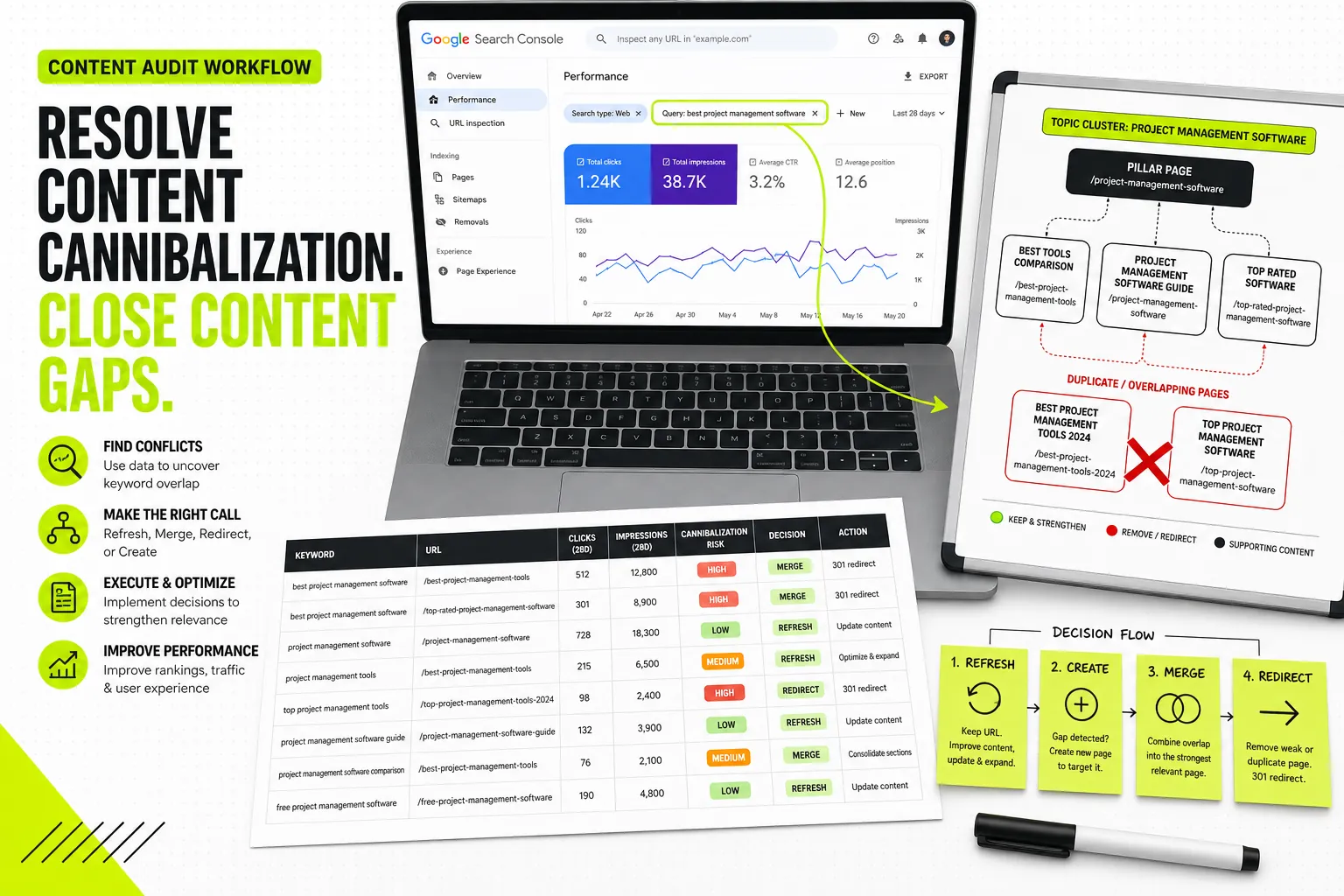
For every primary keyword, look it up in GSC’s query report and check the Pages dimension. If one URL clearly owns the query, that page is your incumbent. If two or more URLs trade impressions for the same query, you’ve found cannibalization, and you need to resolve it in the map before commissioning anything new.
Use SERP overlap to decide whether to merge or split topics
Two clusters that look different on paper can be the same search intent in Google’s eyes. Run the primary keyword of each cluster through a search and compare the results. If the top ten URLs are largely the same across both, Google treats them as one topic, so merge them into a single page. If the results are mostly different, the topics are genuinely distinct and deserve separate URLs. SERP overlap, not semantic similarity, is the deciding vote.
Mark conflicts directly inside the keyword map
When you spot a conflict, don’t fix it in your head, record it. Add a “Conflict” flag or a notes column showing which URLs compete and what the resolution is. A visible conflict log keeps the team from re-creating duplicate pages later and gives editors a checklist of consolidation jobs to clear.
When to consolidate, redirect, refresh, or create a separate page
Use a simple decision rule:
- Consolidate when two pages target the same intent and one is clearly stronger, fold the weaker into the stronger.
- Redirect when you consolidate, 301 the retired URL to the survivor so its equity transfers.
- Refresh when a single page covers the intent but underperforms, improve it rather than replacing it.
- Create only when the SERP is distinct and no existing URL serves the intent.
The bias should always be toward strengthening one URL rather than spreading effort across several.
Manual vs Tool-Assisted Keyword Mapping
When a spreadsheet is enough
For a small site, a new project, or a single topic cluster, a spreadsheet is genuinely all you need. If you’re mapping under 100 keywords, manual grouping in Google Sheets is fast, transparent, and easy to share. You keep full control over every decision and you learn your own data intimately in the process.
Where clustering tools speed up the process
Manual mapping breaks down at scale. Once you’re past a few hundred keywords, grouping by hand becomes slow and inconsistent, and SERP-overlap checks turn into hours of manual searching. That’s where tooling earns its place by automating the clustering and overlap work so you can spend your time on the decisions that need judgement. If you’re weighing your options, our keyword clustering tool comparison breaks down GSC-native, SERP-based, and AI/NLP approaches so you can match the method to your site’s size.
How Dango fits a GSC-first keyword-to-brief workflow
Dango is built around the exact sequence this guide describes, but automated. It connects to Google Search Console in one click, pulls your live impressions, positions, and queries, then clusters them into topic groups using your first-party data rather than third-party volume estimates. Because it also crawls your existing site, it understands which pages you already have, which keeps clusters from being mapped onto topics you’ve already covered, and it generates internal link suggestions and site-aware briefs from those clusters. In other words, it carries a cluster from GSC data straight through to a writer-ready brief without you rebuilding the spreadsheet by hand.
Common mistakes when relying only on third-party keyword volume
The most frequent error in tool-assisted mapping is trusting volume over evidence. Third-party numbers are modelled, often inflated, and blind to the long-tail queries your site already earns impressions for. A keyword with “zero volume” in Ahrefs can be quietly driving impressions in your GSC, and a high-volume term might be hopelessly out of reach for your domain. Map against what Google actually shows you first, then use third-party data to size and fill gaps, never the other way around.
How to Use Your Keyword Map After It Is Built
Turn mapped clusters into SEO briefs
A mapped row is most of a brief already: primary keyword, secondaries, intent, URL, and internal links are all sitting there. Expand each into a full spec by adding the SERP-derived structure, entities to cover, FAQs, and audience context. Our SEO content brief checklist covers exactly what a writer-ready brief should contain so nothing gets lost between the map and the draft.
Prioritise pages by impressions, business value, and ranking potential
Don’t work the map top to bottom. Sequence it. The highest-leverage rows usually combine real GSC impressions (demand exists), clear business value (the topic matters to revenue or pipeline), and reachable rankings (you’re already on page two, or the SERP isn’t dominated by impossible domains). Pages that score on all three go first; everything else queues behind them.
Plan internal links before publishing
You drafted the link plan during mapping, so execute it as part of publishing, not weeks later. Add the inbound links from existing pages on the day the new page goes live, using the anchor text recorded in the map. A page that ships with its internal links already in place gets discovered and ranked faster than one left to accumulate links by accident.
Track whether each mapped page is gaining visibility
Close the loop in GSC. A few months after publishing, check whether each mapped page is gaining impressions and climbing in position for its target queries. If a page is earning impressions for queries you didn’t map to it, fold those into the next refresh. If it’s flat, it may need stronger internal links or a content update. The map is a living document; performance data tells you which rows to revisit.
How Often Should You Update a Keyword Map?
Update cadence for new sites
New sites change fast. Review the map monthly for the first six months, because every published page produces fresh GSC data that reshapes what to target next. Early on, you’re learning which topics your domain can actually rank for, and the map should absorb those lessons quickly.
Update cadence for established content libraries
For mature sites with a settled topic structure, a quarterly review is usually enough. Each quarter, pull updated GSC queries, check for new cannibalization, flag pages that have slipped, and queue refreshes. The structure is stable; you’re maintaining and optimising rather than rebuilding.
Update cadence for large or programmatic SEO sites
Sites with thousands of templated pages need a different rhythm: monitor at the pattern level continuously, and review the underlying keyword templates monthly. You’re not editing individual rows so much as watching which page types gain or lose visibility. For teams mapping keyword patterns to scalable templates and internal-linking systems, our programmatic SEO tool stack covers how the mapping logic scales across large page sets.
Signals that a keyword map needs to change
Regardless of cadence, revisit the map when you see:
- New high-impression queries appearing in GSC that no page owns
- Two URLs starting to trade rankings for the same query
- A mapped page stalling on page two for months
- A competitor newly dominating a SERP you’d planned to target
- A product, service, or seasonal shift that changes which intents matter
Keyword Mapping Examples for Different Site Types
SaaS website example
A B2B SaaS site maps three distinct page types. Informational clusters (“what is keyword mapping”) map to blog guides at the top of the funnel. Commercial-investigation clusters (“[competitor] alternative”, “best [category] tool”) map to comparison and alternative pages mid-funnel. Bottom-funnel clusters (“[integration] integration”) map to dedicated integration pages. The map keeps these from bleeding into each other, the blog guide links down to the comparison page, which links to the relevant integration page, building a clean intent ladder.
Agency or service business example
A service business has fewer pages but sharper intent. The map separates service pages (“seo audit service”) from informational lead-gen content (“how much does an seo audit cost”) and from location pages where relevant. The critical mapping decision here is resisting the urge to create a near-duplicate service page for every keyword variation; one strong service page targeting a primary plus several close secondaries almost always beats five thin ones.
Ecommerce category page example
For ecommerce, the highest-value mapping work happens on category pages, not products. A category like “women’s running shoes” maps as the primary, with secondaries such as “lightweight women’s running shoes” or “women’s trail running shoes” deciding whether you need sub-category pages or just on-page sections. SERP overlap is the test: if “women’s trail running shoes” returns its own distinct category results, it earns a separate page; if it returns the same general results, it stays a filter or section on the parent category.
Programmatic SEO page set example
Programmatic sites don’t map keyword by keyword, they map patterns. One row in the map represents a template, for example “[city] [service] cost”, with the variables, data source, and internal-linking rule defined once and applied across thousands of pages. The mapping discipline here is making sure each pattern targets a genuinely distinct query shape with real GSC or research-backed demand, so you don’t generate ten thousand thin pages competing with each other for the same intent.
Frequently Asked Questions
Can one page target more than one keyword?
Yes, and it should. A well-mapped page targets one primary keyword plus a cluster of related secondary keywords that share the same intent. The rule isn’t one keyword per page; it’s one intent per page. As long as the variations all want the same answer, a single page can and should rank for all of them.
How many keywords should be mapped to a single page?
There’s no fixed number. A page typically owns one primary keyword and anywhere from a handful to a few dozen secondaries, depending on how broad the topic is. What matters is that every keyword on the row shares the page’s intent. If you find yourself stretching to include a keyword with a different SERP, that’s a signal it belongs on a separate page.
Should branded keywords be included in a keyword map?
Include them, but treat them separately. Branded queries (your company name, product names) are navigational and almost always map to your homepage, product pages, or specific feature pages. They’re worth recording so you know they’re covered, but keep them in their own section so they don’t distort prioritisation of your non-branded, growth-driving clusters.
What should I do if two pages already rank for the same keyword?
First confirm it in GSC by checking which URLs earn impressions for the query. Then decide based on strength and SERP overlap: if both target the same intent, consolidate the weaker page into the stronger one and 301 redirect it. If they actually serve different intents, differentiate them clearly, adjust titles, headings, and internal links so each owns its own angle.
Is keyword mapping useful for small websites with little traffic?
Especially so. Small sites can’t afford to split authority across competing pages, and a tight map ensures every page earns its place. Even with little traffic, GSC will show single-digit impressions that reveal which queries Google already associates with you, and those are the most reliable targets to build your first map around.
Can AI do keyword mapping accurately?
AI can accelerate the clustering and overlap-checking that underpin mapping, and tools that work from your real GSC data rather than generic models produce far more reliable groupings. But the final page-assignment decisions, consolidate or split, refresh or create, still benefit from human judgement about business value and SERP reality. The best workflow uses AI to do the heavy lifting and a human to make the calls.
What is the difference between a topical map and a keyword map?
A topical map describes the broad subject areas a site should cover and how they relate, it’s a high-level model of your authority. A keyword map is more granular and operational: it assigns specific queries to specific URLs with actions and owners. The topical map shapes strategy; the keyword map turns that strategy into a production plan.
Should keyword mapping be done before or after writing content?
Before. Mapping is what tells you whether to write at all, and if so, what to write and where it lives. Writing first and mapping later is how cannibalization and duplicate angles creep in. Build the map, plan the internal links, then brief and write, so every page is created with a clear, conflict-free job to do.